Shared vs VPS vs Dedicated Hosting: Which One Is Right for Your Business?
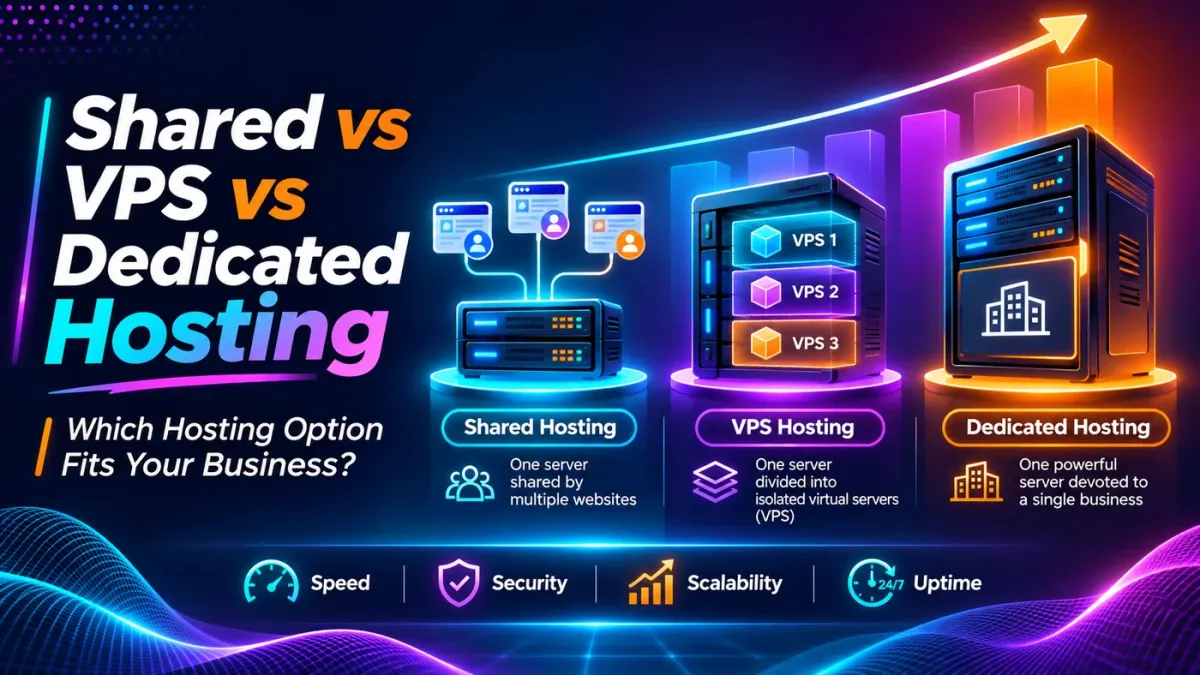
Choosing the right web hosting environment is one of the most important decisions when launching or growing a business website.
Whether you operate a small company website, an online store, a high-traffic blog, or a custom business application, your hosting infrastructure plays a significant role in website performance, reliability, security, and scalability.
However, the hosting market can be confusing. Providers offer shared hosting, VPS hosting, dedicated servers, and numerous variations of managed and cloud hosting. Each option comes with different resources, responsibilities, and costs.
A small business website displaying services and contact information does not necessarily require the same infrastructure as an e-commerce platform handling hundreds of simultaneous transactions.
Similarly, an expensive dedicated server is not automatically the best choice for every business.
The right hosting solution depends on your website's actual requirements, expected growth, technical complexity, and available budget.
In this guide, we'll compare shared hosting, Virtual Private Server (VPS) hosting, and dedicated hosting, explain their advantages and limitations, and help you understand which option makes the most sense for your business.
Why Does Your Choice of Web Hosting Matter?
Your website is often the first interaction customers have with your business.
When a visitor opens your website, they expect pages to load smoothly, information to remain accessible, and essential features to work without interruption.
Behind that experience is a hosting environment responsible for serving files, processing application requests, and supporting database operations.
If the hosting infrastructure lacks adequate resources, the website may struggle under traffic, experience slow response times, or encounter resource-related errors.
For businesses using websites to generate leads, manage customers, or process transactions, these problems can have real commercial consequences.
Hosting also influences how easily your website can grow.
A basic informational website might work well on a low-cost shared hosting plan. However, as the business adds custom functionality, user accounts, integrations, or traffic-intensive features, the original environment may become unsuitable.
Understanding the differences between hosting types allows you to make a more informed decision instead of selecting a plan based only on advertised prices or technical specifications.
What Is Shared Hosting?
Shared hosting is a hosting model in which multiple websites operate within the same physical server environment and share its computing resources.
The hosting provider manages the underlying infrastructure and allocates resources across customer accounts.
Because many customers share the server's operating costs, shared hosting is typically one of the most affordable ways to publish a website.
For example, consider a small accounting firm with a website containing its homepage, service descriptions, contact details, and a few informational articles.
Such a website may not require significant processing power or advanced server customization.
A properly configured shared hosting environment can provide the resources needed to operate it reliably.
How Shared Hosting Works
In shared hosting, a physical server hosts multiple websites.
These websites generally share resources such as CPU processing capacity, memory, storage infrastructure, and network connectivity.
The hosting provider may use resource limits and account isolation technologies to prevent one customer from consuming excessive resources.
However, the level of isolation varies between hosting providers.
Because customers usually do not receive full administrative access, they may also face restrictions on installing custom software or changing server configurations.
Advantages of Shared Hosting
Shared hosting offers several benefits, particularly for beginners and smaller businesses.
Affordable pricing: Costs are shared across multiple hosting accounts.
Easy administration: Providers typically offer a hosting control panel.
Minimal technical requirements: Server administration is mostly handled by the provider.
Quick deployment: Basic websites can usually be launched without complex setup.
Suitable for simpler websites: Lightweight business websites and blogs may not need more advanced infrastructure.
For organizations that primarily need an online presence, these advantages can make shared hosting an economical starting point.
Limitations of Shared Hosting
Shared hosting also has limitations that become important as website requirements increase.
Resource allocations may be restricted, and heavy activity within the shared environment can sometimes affect performance.
You may have limited control over PHP extensions, server configuration, background processes, and other system-level settings.
Shared hosting plans may also impose restrictions on CPU usage, concurrent processes, database activity, or file operations.
These limitations can become problematic for custom applications requiring specific runtime configurations or consistently high processing capacity.
Who Should Choose Shared Hosting?
Shared hosting is generally suitable for:
Small business and company websites
Personal portfolios
New blogs
Informational websites
Landing pages and simple promotional websites
Startups with limited hosting requirements
If your website is relatively lightweight, receives manageable traffic, and does not require advanced server customization, quality shared hosting may be sufficient.
What Is VPS Hosting?
VPS stands for Virtual Private Server.
VPS hosting uses virtualization technology to divide a physical server into multiple independent virtual server environments.
Each VPS has an operating environment with allocated computing resources and a greater degree of isolation than traditional shared hosting.
This means businesses can obtain more control and predictable resource allocations without purchasing an entire physical server.
VPS hosting is often considered the middle ground between shared hosting and dedicated hosting.
It provides greater flexibility than shared hosting while generally remaining more affordable than an entire dedicated server.
How VPS Hosting Works
A physical server runs virtualization software that creates separate virtual machines.
Each virtual machine can have its own operating system, allocated CPU resources, memory, storage, and network configuration.
Depending on the provider, customers may receive root or administrator access to configure their environment.
For example, a business running a custom Laravel application may require Nginx, PHP-FPM, MySQL, Redis, scheduled tasks, and background queue workers.
A VPS allows the development team to configure these components according to the application's requirements.
Although virtual servers still depend on shared physical hardware, virtualization generally provides stronger separation and resource allocation than conventional shared hosting.
Advantages of VPS Hosting
VPS hosting offers several important advantages for growing websites and custom applications.
Allocated resources: Defined CPU, RAM, and storage allocations.
Greater control: Ability to customize server software and configurations.
Improved isolation: Separate virtual environments reduce interference between customers.
Flexible application support: Suitable for custom frameworks, APIs, and background processes.
Scalability: Resources can often be upgraded as requirements increase.
Cost efficiency: Offers advanced capabilities without requiring an entire physical server.
For businesses that need more control over their applications, these benefits can justify the additional cost.
Limitations of VPS Hosting
A VPS is not automatically faster or more secure than every shared hosting service.
Actual results depend on physical hardware, virtualization technology, resource allocation, network quality, and configuration.
VPS hosting can also require technical administration.
With unmanaged VPS plans, customers may be responsible for server security, operating system updates, backups, firewall rules, database configuration, and troubleshooting.
Businesses without an experienced technical team should consider whether managed VPS hosting would be more appropriate.
Who Should Choose VPS Hosting?
VPS hosting is commonly suitable for:
Growing business websites
E-commerce stores with increasing resource requirements
Custom Laravel and PHP applications
Database-driven websites
Membership portals and business dashboards
Applications requiring background jobs or custom server software
Businesses needing more predictable resource allocations
For many growing businesses, VPS hosting provides a practical balance between flexibility, performance potential, and operating costs.
What Is Dedicated Hosting?
Dedicated hosting provides an entire physical server allocated to a single customer.
Unlike shared hosting or VPS hosting, the customer's server is not divided among unrelated hosting accounts.
The organization receives access to the physical machine's computing resources and can typically configure the environment according to its requirements.
Dedicated hosting is often associated with demanding applications, substantial workloads, specialized configurations, and organizations that require greater control over physical infrastructure.
How Dedicated Hosting Works
With dedicated hosting, the provider allocates a physical server to one customer.
The server may include a specified number of processor cores, memory capacity, storage drives, and network resources.
Depending on the service arrangement, the customer or hosting provider manages the operating system, applications, security updates, and monitoring.
For example, an organization running a resource-intensive business application may require a particular combination of CPU capacity, memory, storage performance, and network configuration.
A dedicated server can provide hardware resources without sharing the physical server with unrelated customers.
Advantages of Dedicated Hosting
Dedicated hosting offers important benefits for workloads with demanding or specialized requirements.
Exclusive physical resources: The server's hardware is allocated to one customer.
High configuration flexibility: Greater control over operating system and server settings.
Strong physical-level isolation: No unrelated customers sharing the server.
Predictable hardware capacity: Useful for consistently demanding workloads.
Specialized configurations: Greater freedom to select hardware and software arrangements.
Suitable for complex applications: Can support intensive database, processing, or application workloads.
These advantages are valuable when the business has clearly established infrastructure requirements.
Limitations of Dedicated Hosting
Dedicated hosting generally involves higher costs than shared or entry-level VPS hosting.
It may also introduce greater operational responsibilities, particularly when the service is unmanaged.
Scaling a dedicated server can require hardware upgrades, application migration, or additional servers.
Another important consideration is availability.
A dedicated server does not automatically guarantee better uptime or complete protection against hardware failure.
If the server experiences a hardware problem, the website may become unavailable unless redundancy and recovery arrangements have been implemented.
Who Should Choose Dedicated Hosting?
Dedicated hosting may be appropriate for:
Resource-intensive web applications
Large e-commerce operations
High-demand database workloads
Enterprise applications
Specialized server configurations
Organizations with defined infrastructure isolation requirements
Businesses requiring exclusive physical hardware
Dedicated hosting is most valuable when the need for its resources and control can be justified through actual workload requirements.
Shared vs VPS vs Dedicated Hosting: Complete Comparison
The following table highlights the main differences between these hosting models.
Feature | Shared Hosting | VPS Hosting | Dedicated Hosting |
|---|---|---|---|
Infrastructure | Multiple websites share a server | Separate virtual servers on physical hardware | Entire physical server for one customer |
Cost | Generally low | Moderate | Generally high |
CPU and RAM | Shared, subject to limits | Allocated virtual resources | Physical server resources |
Server control | Limited | Moderate to high | High |
Isolation | Account-level, provider-dependent | Virtual machine isolation | Physical server isolation |
Scalability | Mostly plan upgrades | Often flexible resource upgrades | Hardware upgrades or additional servers |
Technical expertise | Usually minimal | Depends on management level | Often significant if unmanaged |
Custom software | Restricted | Generally supported | Highly customizable |
Best suited for | Smaller websites | Growing websites and applications | Specialized or demanding workloads |
These are general characteristics. Real-world capabilities vary between hosting providers, plans, and management arrangements.
A well-managed VPS may be more reliable for a particular application than an improperly configured dedicated server.
The right decision should therefore consider the complete service, not simply the hosting category.
Shared Hosting vs VPS Hosting: What Is the Main Difference?
The biggest practical differences between shared and VPS hosting are resource allocation, server control, and isolation.
With shared hosting, customers use a hosting environment managed by the provider, usually with limited access to system-level settings.
With VPS hosting, customers receive a separate virtual server environment with allocated resources and potentially full administrative control.
This distinction becomes important when a website needs custom software, scheduled background processes, or configurations not available through shared hosting.
For example, a standard business website may run comfortably on shared hosting.
However, if the business introduces a custom customer portal using Laravel, Redis caching, scheduled jobs, and dedicated queue workers, VPS hosting may offer the flexibility needed.
That does not mean every Laravel application requires a VPS. Some Laravel websites can run successfully on suitable shared or managed hosting.
The deciding factor is whether the available hosting environment supports the application's actual requirements.
VPS Hosting vs Dedicated Hosting: Which Offers Better Value?
VPS hosting and dedicated hosting can both provide substantial control over the server environment.
The main distinction is that a VPS runs on virtualized infrastructure, while dedicated hosting assigns an entire physical server to one customer.
For many business websites and applications, VPS hosting offers sufficient performance and flexibility at a lower cost.
Dedicated hosting becomes more attractive when the application consistently requires extensive computing resources, specialized hardware, or physical-server isolation.
For example, a business application with moderate traffic and predictable database workloads may function efficiently on a managed VPS.
An application performing intensive processing or maintaining very large databases may benefit from a dedicated environment.
However, dedicated hosting should not be selected solely because it sounds more powerful.
A correctly sized VPS can outperform an underpowered or poorly configured dedicated server for certain workloads.
How Hosting Affects Website Performance
Website speed depends on several interacting factors.
Hosting resources influence server response times, database execution, and the ability to handle concurrent requests.
However, the hosting plan is only one part of the overall performance picture.
Poorly optimized images, excessive JavaScript, inefficient database queries, missing caching, and unnecessary third-party scripts can slow down websites even on powerful servers.
Before upgrading hosting, it is important to determine whether performance problems are actually caused by resource limitations.
For example, a website experiencing high CPU utilization during normal activity may benefit from additional computing resources.
A website slowed down by oversized images might improve significantly through image optimization without changing servers.
At MDITech, website performance is evaluated across application code, database operations, caching, and infrastructure.
You can explore these techniques in our guide on how we optimize websites for speed and scalability.
Which Hosting Type Is More Secure?
Security is one of the most commonly misunderstood aspects of hosting comparisons.
Dedicated hosting provides exclusive access to physical server resources, while VPS hosting generally provides stronger isolation than conventional shared hosting.
However, stronger isolation does not automatically make a website secure.
A poorly maintained dedicated server can be vulnerable to outdated software, weak credentials, exposed services, and application-level security flaws.
Similarly, a properly managed shared hosting environment can provide adequate protection for many smaller websites.
Important security considerations include:
Regular operating system and application updates
Secure authentication and access controls
Firewall configuration
Malware monitoring
Reliable backups
Vulnerability management
Appropriate isolation between applications
Incident monitoring and recovery procedures
The responsibilities for these controls depend on whether the hosting service is managed or unmanaged.
For more detailed guidance, read how to protect your website from hackers and malware.
Managed vs Unmanaged Hosting: An Important Factor
When comparing hosting options, businesses should also consider who will manage the infrastructure.
Managed and unmanaged hosting describe the service responsibilities rather than the physical server type.
Managed Hosting
With managed hosting, the provider performs an agreed set of technical responsibilities.
These may include server configuration, updates, monitoring, backups, and technical support.
The exact services vary between providers.
Managed hosting can be particularly useful for businesses without an internal server administration team.
Unmanaged Hosting
With unmanaged hosting, the customer receives infrastructure access but takes responsibility for most server administration tasks.
This may include installing software, configuring security controls, managing updates, monitoring system health, and troubleshooting failures.
Unmanaged hosting can be suitable for experienced developers and organizations with dedicated technical staff.
A lower unmanaged server price does not necessarily mean lower total operating costs once administration time and support requirements are considered.
Read our detailed comparison of managed hosting vs unmanaged hosting before deciding which approach suits your organization.
Which Hosting Type Should Different Businesses Choose?
The best hosting environment depends on what the website does and how important it is to business operations.
Small Local Business Website
A local consultancy, clinic, coaching institute, or small service provider may primarily need a website displaying services and generating enquiries.
If the site is lightweight and traffic is manageable, reliable shared hosting may be sufficient.
Ease of administration, support quality, backups, and website availability are often more important than advanced server customization.
E-Commerce Website
Online stores require reliable database operations, product management, checkout functionality, and secure payment integration.
A small store may operate successfully on suitable managed shared hosting.
As order activity and resource requirements increase, a managed VPS may provide greater flexibility.
Dedicated hosting may be worth considering for specialized or consistently resource-intensive commerce platforms.
News Portal or High-Traffic Blog
Publishing websites may experience sudden increases in visitors when popular articles attract attention.
Efficient caching, optimized images, CDN integration, and database performance are especially important.
A growing news portal may benefit from VPS hosting because it provides greater control over application caching, background processing, and resource allocation.
However, hosting upgrades should be based on actual traffic and resource measurements.
Custom Laravel Application
Custom Laravel applications can require application-specific server configurations.
Features such as background jobs, scheduled tasks, caching services, APIs, file processing, and complex database queries may increase infrastructure requirements.
A VPS environment is often a practical choice because it supports custom configuration and deployment processes.
Dedicated hosting may become appropriate when resource requirements justify exclusive physical hardware.
Enterprise or Resource-Intensive Application
Larger applications may require substantial computing capacity, specialized storage, strict infrastructure separation, or advanced operational control.
Dedicated hosting can be suitable for these requirements.
However, enterprises should also evaluate cloud infrastructure, high-availability architectures, disaster recovery, and multi-server configurations rather than assuming a single dedicated server will meet every requirement.
When Should You Upgrade from Shared Hosting to VPS?
Many businesses begin with shared hosting and move to VPS hosting as their websites become more demanding.
However, increasing visitor numbers alone do not always justify an upgrade.
A properly optimized website may continue operating efficiently on shared hosting even as traffic grows.
Instead, look for measurable signs that the current hosting environment has become unsuitable.
Common warning signs include:
Frequent CPU or memory resource-limit errors
Consistently slow server response times
Restrictions on necessary server software
Background processes that cannot run reliably
Database performance problems caused by resource constraints
Difficulty handling peak user activity
Hosting limits that prevent required application features
Before migrating, investigate whether application optimization, caching, database improvements, or configuration changes could resolve the issue.
If the existing plan genuinely lacks necessary resources or flexibility, a VPS upgrade may provide a sustainable solution.
Is Dedicated Hosting Always Better Than VPS?
Not necessarily.
Dedicated hosting provides exclusive physical resources, but the quality of the actual server still matters.
A modern VPS backed by fast processors and NVMe storage may perform better for a particular application than an older dedicated server with slower hardware.
Similarly, a well-configured VPS environment can deliver better reliability than an unmanaged dedicated server with inadequate monitoring and recovery processes.
The appropriate choice depends on workload requirements, hardware specifications, architecture, management quality, and total cost.
For businesses considering storage performance, our article on SSD vs NVMe hosting explains why storage technology is another factor worth evaluating.
What About Cloud Hosting?
Cloud hosting is another option businesses may encounter when comparing infrastructure.
Cloud environments use virtualized computing, storage, and networking services, often with flexible provisioning and scaling capabilities.
However, cloud hosting is not simply a fourth performance level above dedicated hosting.
Some cloud services are effectively virtual servers, while others provide managed platforms, databases, load balancing, and distributed infrastructure.
Cloud hosting can be useful for businesses with variable workloads or more advanced scalability requirements.
Its suitability depends on architecture, pricing, operational complexity, and the provider's capabilities.
For a smaller business website, a simple VPS or managed hosting plan may be more practical than a complex cloud configuration.
Cost Comparison: Shared vs VPS vs Dedicated Hosting
Hosting costs vary significantly depending on resource allocation, hardware quality, server location, management services, and contract terms.
Shared hosting generally has the lowest initial cost.
VPS hosting usually costs more because it provides allocated virtual resources and greater control.
Dedicated hosting typically has the highest infrastructure cost because the entire physical server is assigned to one customer.
However, the advertised monthly or annual fee is only part of the total cost.
Businesses should also consider:
Initial setup and migration
Server administration
Backup storage and restoration
Security monitoring
Software licenses
Additional storage and bandwidth
Technical support
Hardware or resource upgrades
Renewal prices
An unmanaged VPS may appear inexpensive until the cost of ongoing administration is included.
Similarly, a dedicated server may provide more computing power than a small business can use efficiently.
The best value comes from choosing infrastructure that meets the website's needs without unnecessary expense.
Our article on the real cost of cheap hosting explains why businesses should evaluate long-term hosting value rather than introductory prices alone.
How to Choose the Right Hosting for Your Business
Choosing between shared, VPS, and dedicated hosting becomes easier when you evaluate a few essential questions.
What Does Your Website Actually Do?
Identify whether your website primarily displays information, manages enquiries, processes transactions, or runs a custom business application.
The more complex the functionality, the more important server flexibility and resource allocation may become.
How Much Traffic Does Your Website Receive?
Review traffic patterns and peak concurrent activity, not just monthly visitor totals.
Two websites with identical monthly traffic may have very different server requirements depending on their caching, application logic, and user behavior.
Do You Need Custom Server Software?
If your application requires specific software packages, background workers, or system-level configuration, VPS or dedicated hosting may be appropriate.
What Is Your Budget?
Evaluate the total cost of ownership, including administration and support.
Avoid choosing infrastructure solely because it is inexpensive or appears powerful.
How Important Are Reliability and Support?
For websites essential to business operations, uptime monitoring, backups, recovery procedures, and dependable technical support deserve careful attention.
How Quickly Might Your Requirements Change?
Choose an environment with a practical upgrade path.
A business expecting significant application growth may benefit from the flexibility of VPS or cloud infrastructure.
Why Consider MDITech for Web Hosting?
At MDITech, we believe hosting should match the actual needs of your website and business.
Our approach connects website development, infrastructure management, and ongoing technical support so businesses can make practical hosting decisions.
MDITech offers managed hosting solutions focused on website performance, availability, security, and dependable operation.
Our publicly advertised managed hosting services include SSL support, routine backups, monitoring, and technical assistance. The specific resources and service commitments depend on the selected hosting arrangement.
We understand that a small informational website may require a very different environment from a custom Laravel application or a growing online platform.
For businesses without an internal server administration team, managed hosting can simplify technical responsibilities and provide a clearer support arrangement.
Rather than selecting the most expensive hosting model, we recommend evaluating application requirements, resource usage, growth expectations, and operational responsibilities.
Explore MDITech's web hosting services to understand the available solutions.
Conclusion
Shared hosting, VPS hosting, and dedicated hosting each serve different purposes.
Shared hosting is an affordable and convenient starting point for smaller websites with straightforward requirements.
VPS hosting offers a useful balance of resource allocation, control, flexibility, and cost for growing businesses and custom applications.
Dedicated hosting provides exclusive physical hardware and extensive configuration control for specialized or demanding workloads.
However, no single option is automatically the fastest, safest, or most reliable in every situation.
The best hosting decision considers the entire environment, including application optimization, server management, security, backups, monitoring, and technical support.
For most businesses, the goal should be to choose infrastructure that meets current requirements while providing a realistic path for future growth.
Need help choosing between shared, VPS, and dedicated hosting?
Explore MDITech's managed web hosting solutions or contact our team to discuss your website's technical requirements, expected traffic, and growth plans.
Frequently Asked Questions
1. What is the main difference between shared, VPS, and dedicated hosting?
Shared hosting allows multiple websites to use the same provider-managed server environment. VPS hosting provides separate virtual server environments with allocated resources. Dedicated hosting assigns an entire physical server to one customer.
2. Is VPS hosting better than shared hosting?
VPS hosting generally provides greater control, resource allocation, and isolation. However, shared hosting may be more cost-effective for smaller websites that do not require advanced configurations.
3. Which hosting is best for a small business website?
For a simple informational website, quality shared or managed hosting may be sufficient. Growing websites, e-commerce stores, and custom applications may benefit from VPS hosting.
4. Is dedicated hosting faster than VPS hosting?
Not always. Dedicated hosting provides exclusive physical resources, but performance depends on hardware specifications, application design, storage, and server configuration. A modern VPS can outperform an older dedicated server for some workloads.
5. Can a Laravel application run on shared hosting?
Yes, some Laravel applications can run on shared hosting when the environment supports their requirements. More complex applications involving background workers, custom server configurations, or substantial resource usage may be better suited to VPS hosting.
6. Which hosting is more secure: VPS or dedicated?
Dedicated hosting provides exclusive physical hardware, while VPS hosting provides virtualization-based isolation. Both can be secure when properly configured and maintained. Security depends on access controls, updates, monitoring, backups, and application protection.
7. When should I upgrade from shared hosting to VPS?
Consider upgrading when you encounter recurring resource-limit problems, need greater server control, or require application features that your shared hosting plan cannot support. Investigate optimization opportunities before migrating.
8. Is VPS hosting suitable for e-commerce websites?
Yes. VPS hosting can be suitable for e-commerce websites requiring allocated resources, customized configurations, and additional operational flexibility. The actual requirements depend on the platform, traffic, and transaction workload.
9. What is managed VPS hosting?
Managed VPS hosting combines a virtual private server with an agreed level of provider administration. Services may include updates, security configuration, monitoring, backups, and technical support.
10. Does dedicated hosting guarantee 100% uptime?
No. Dedicated servers can experience hardware failures, software problems, and network outages. High availability requires appropriate redundancy, monitoring, and recovery arrangements.
11. Is cloud hosting the same as VPS hosting?
Not exactly. VPS hosting refers to a virtual server environment, while cloud hosting describes a broader infrastructure model that may include virtual servers, managed services, distributed storage, and flexible scaling.
12. How much does shared, VPS, or dedicated hosting cost in India?
Prices vary widely depending on hardware, resource allocations, server management, support, and contract terms. Shared hosting is generally the least expensive, VPS hosting costs more, and dedicated hosting typically requires the highest infrastructure investment.
Tagged in

Written by
Madhavendra DuttI build modern, high-performance websites and provide secure hosting and strategic digital marketing solutions that help businesses grow online. My focus is on clean development, speed, reliability, and measurable results.
View all posts →Related Posts
Continue exploring similar topics

Choosing the right web hosting plan is essential for website speed, security, and reliabil...

Keep your business website secure, fast, and reliable with this practical monthly maintena...

Protect your business website from hackers, malware, and data breaches. Learn essential we...