How to Protect Your Website from Hackers and Malware
Your website is more than an online presence. It is a digital asset that connects your business with customers, generates enquiries, processes transactions, and builds trust. But as businesses increasingly rely on websites, the risk of cyberattacks, malware infections, and unauthorized access continues to be a serious concern.
A hacked website can disrupt business operations, expose sensitive customer information, redirect visitors to malicious pages, or damage your brand's reputation. Even a small business website can become a target because many attacks are automated and exploit common vulnerabilities rather than targeting a specific organization.
The good news is that you don't need an enterprise-level cybersecurity budget to significantly improve your website's protection. By following proven security practices, choosing reliable hosting, and maintaining your website regularly, you can reduce the risk of common attacks.
In this guide, we'll explain how hackers compromise websites, the warning signs of malware, and practical steps you can take to protect your business online.
Why Website Security Matters for Every Business
Website security is often overlooked until something goes wrong. Many business owners assume that smaller websites are unlikely to attract attackers. Unfortunately, automated scanning tools can search the internet for vulnerable websites regardless of their size or popularity.
An attacker might exploit an outdated plugin, a weak administrator password, an exposed server service, or an application vulnerability. Once a website is compromised, the attacker may use it to steal data, distribute malware, send spam, or redirect visitors.
The business impact can extend beyond the technical problem. A security incident may lead to lost enquiries, interrupted sales, recovery expenses, customer complaints, and potential legal obligations if personal data is affected.
Website protection should therefore be treated as an ongoing business responsibility, not simply an optional technical feature.
Common Website Security Threats You Should Know
Understanding common threats makes it easier to choose appropriate protection measures.
1. Malware Infections
Malware refers to malicious software or code designed to compromise a system, steal information, or perform unauthorized activities.
Website malware can be introduced through vulnerable applications, compromised administrator accounts, malicious extensions, or improperly secured servers.
Infected websites may display unwanted advertisements, redirect users to suspicious domains, or load harmful scripts without the website owner's knowledge. Some infections remain hidden and run malicious activities in the background.
2. Brute-Force and Credential Attacks
A brute-force attack involves repeatedly attempting passwords until a valid combination is found. Credential-stuffing attacks use usernames and passwords exposed in previous data breaches.
Websites with weak passwords, reused credentials, or poorly protected administrator login pages are especially vulnerable.
Strong authentication policies, multifactor authentication, and login rate limiting can significantly reduce these risks.
3. SQL Injection
SQL injection occurs when an application improperly handles user-controlled input in database queries.
An attacker may exploit this vulnerability to access, modify, or delete database information.
Modern frameworks such as Laravel provide parameterized database queries through their database tools, helping developers reduce SQL injection risks when used correctly. However, unsafe raw queries can still introduce vulnerabilities.
4. Cross-Site Scripting (XSS)
Cross-site scripting occurs when an attacker causes a website to execute malicious JavaScript in another user's browser.
This can result in unauthorized actions, data exposure, or the manipulation of website content.
Developers should apply context-aware output encoding, validate input where appropriate, and use a carefully configured Content Security Policy as additional protection.
5. Distributed Denial-of-Service (DDoS) Attacks
A DDoS attack attempts to overwhelm a website or its infrastructure with large amounts of traffic, making it unavailable to legitimate visitors.
Although DDoS attacks do not necessarily involve stealing data, prolonged downtime can disrupt business operations and cause financial losses.
Traffic filtering, rate limiting, content delivery networks, and hosting infrastructure with DDoS mitigation capabilities can help improve resilience.
Security guidance from CERT-In identifies malware, ransomware, website defacement, data breaches, and DDoS incidents as significant business risks.
10 Practical Ways to Protect Your Website from Hackers and Malware
1. Keep Your Website Software Updated
Outdated software is one of the most common sources of website vulnerabilities. Content management systems, plugins, themes, frameworks, and server applications may contain security weaknesses discovered after their initial release.
Developers and software vendors regularly publish patches that address these weaknesses. Delaying important security updates can leave known vulnerabilities exposed.
For WordPress websites, regularly review the installed core version, plugins, and themes. Remove extensions that are no longer maintained or needed.
For custom applications built with Laravel or other frameworks, monitor framework updates, Composer and npm dependencies, and server runtime versions.
Before major changes, create a backup, check compatibility, and test critical functionality.
Regular maintenance reduces unnecessary exposure to known security issues. Read our related guide on what happens when you don't update your website.
2. Use Strong Passwords and Multifactor Authentication
Weak or reused passwords can allow attackers to gain administrative access without exploiting a technical vulnerability.
Every website administrator should use a long, unique password generated and stored using a trusted password manager.
Multifactor authentication (MFA) adds another verification step. Even when a password is stolen, MFA can prevent many unauthorized login attempts.
Prioritize MFA for:
Website administrator and hosting control-panel accounts
Domain registrar and DNS accounts
Server administration and cloud-provider accounts
Business email accounts connected to password resets
Where available, phishing-resistant MFA methods such as passkeys or hardware security keys provide stronger protection.
It is also important to remove accounts belonging to former employees or contractors and restrict administrative permissions to people who genuinely need them.
3. Install an SSL Certificate and Enforce HTTPS
HTTPS encrypts information transmitted between a visitor's browser and your website.
Without HTTPS, data sent over an insecure connection may be vulnerable to interception or modification.
An SSL/TLS certificate allows browsers to establish encrypted connections with the website. This is particularly important for login pages, contact forms, customer dashboards, and checkout processes.
However, HTTPS does not mean that a website is malware-free or fully secure. It protects data in transit but does not eliminate application vulnerabilities, weak passwords, or server misconfigurations.
Ensure that your website redirects HTTP requests to HTTPS, uses valid certificates, and does not load sensitive resources over insecure connections.
4. Choose Secure and Reliable Web Hosting
Your hosting environment plays an important role in your website's overall security.
A website running on poorly maintained infrastructure may face additional risks from outdated server software, weak isolation, insecure configurations, or inadequate monitoring.
When evaluating a hosting provider, consider whether it offers:
Security updates and server maintenance
Firewall protection and DDoS mitigation options
SSL/TLS configuration and backup facilities
Appropriate account isolation and access controls
Monitoring, support, and documented recovery procedures
For businesses without dedicated system administrators, managed hosting can reduce the burden of maintaining server infrastructure.
Explore MDITech's managed web hosting solutions or read our comparison of managed vs unmanaged hosting to understand the responsibilities involved.
5. Configure a Web Application Firewall (WAF)
A web application firewall helps inspect incoming HTTP requests and block certain malicious patterns before they reach your website.
For example, properly configured WAF rules may help detect known injection attempts, automated abuse, and suspicious request behavior.
A WAF can complement your application security controls, but it does not replace secure coding or software updates.
Consider combining it with request rate limiting, bot management, and access restrictions for sensitive administrative endpoints.
Review WAF logs and rule changes periodically to reduce false positives that could block legitimate users.
6. Back Up Your Website Regularly
Backups are an important part of recovery planning.
If a website becomes infected with malware, suffers accidental deletion, or experiences a server failure, a usable backup may allow you to restore operations.
A backup strategy should cover both application files and databases, along with other required configuration and recovery information.
The commonly recommended 3-2-1 approach involves maintaining three copies of important data, using two different storage types, with at least one copy stored separately.
For additional resilience, consider immutable or offline copies that an attacker cannot easily modify or delete.
Most importantly, test your backups. A backup that cannot be restored is not a reliable recovery plan.
Restore tests should be carried out in an isolated environment, and recovery credentials should be protected independently from the production website.
7. Scan Your Website for Malware and Suspicious Changes
Regular monitoring can help identify suspicious activity before it causes widespread damage.
Depending on your hosting environment and application, security monitoring may include malware scans, file-integrity monitoring, server log analysis, and vulnerability checks.
Some warning signs include unexpected file modifications, unfamiliar administrator accounts, unusual outbound requests, or unexplained changes to website content.
However, not every website compromise will trigger a visible alert. Automated tools should therefore complement, rather than replace, security reviews and investigation.
If a scanner reports suspicious code, avoid deleting files indiscriminately. Investigate the underlying cause to prevent the infection from returning.
8. Secure File Uploads, Permissions, and Database Access
File uploads are useful for content management systems, business applications, and customer portals, but improperly secured upload functionality can introduce serious risks.
Applications should validate file types, file sizes, and permitted content. Sensitive uploads should be stored in protected locations, with access controlled by the application.
Avoid allowing uploaded files to execute as server-side code.
Database accounts should receive only the permissions they require. Production credentials must be stored securely and never exposed through public repositories or web-accessible configuration files.
For Laravel applications, additional precautions include keeping ".env" inaccessible from the web, disabling debug mode in production, and ensuring the web server uses the "public" directory as its document root.
Secure development decisions make it considerably harder for attackers to exploit common misconfigurations.
9. Monitor Website Activity and Set Up Security Alerts
Security is not a one-time configuration. Websites evolve through software changes, new features, content updates, and infrastructure adjustments.
Monitoring helps identify problems such as repeated failed login attempts, unusual traffic patterns, unexpected administrator activity, and server errors.
Configure alerts for important events, including:
Suspicious authentication activity
Unexpected changes to critical files
Expiring TLS certificates
Backup failures
Unusual resource usage or traffic spikes
Maintain appropriate logging and protect logs from unauthorized modification. Sensitive information such as passwords, tokens, and personal data should not be unnecessarily recorded.
10. Conduct Periodic Security Audits
Even websites following good security practices may develop new weaknesses over time.
Periodic security reviews help assess whether existing protections remain effective as applications and infrastructure change.
A security audit may include reviewing software versions, access permissions, SSL/TLS configuration, exposed services, firewall rules, dependency vulnerabilities, backups, and application behavior.
For custom websites, security testing should also consider authorization, session handling, input processing, and the risks described by the OWASP Top 10.
Businesses handling financial information, customer accounts, or sensitive records may require more frequent and specialized assessments.
Additional Security Measures for WordPress and Laravel Websites
Different website platforms require different security precautions.
For WordPress websites, use trustworthy themes and plugins, remove unused extensions, enable MFA, and maintain reliable updates and backups. Avoid installing nulled or pirated plugins because their code and update sources cannot be trusted.
For Laravel websites, use supported framework and PHP versions, validate incoming requests, enforce authorization policies, and use Blade's default escaping for untrusted content. Avoid unsafe raw SQL and review file-upload handling, queue permissions, and background jobs.
Development and production environments should remain separate. Production secrets must never be included in version control or exposed to client-side JavaScript.
Where possible, establish a deployment process that includes automated tests, dependency checks, and a rollback strategy.
How to Recognize a Hacked or Malware-Infected Website
Not every compromised website displays obvious warning messages. Some attackers deliberately hide their activity for extended periods.
Nevertheless, several signs should prompt immediate investigation.
A website may start redirecting visitors to unrelated pages, displaying unfamiliar advertisements, or producing unexpected login and browser warnings.
Other indicators include changes to files you did not authorize, new administrator accounts, a sudden increase in spam activity, unusual outbound traffic, or unexplained resource consumption.
Search engines or security scanners may also flag suspicious content.
A single warning does not automatically confirm a compromise, but unexpected changes should be investigated promptly.
What to Do If Your Website Has Already Been Hacked
If you suspect that your website has been compromised, avoid making random changes without understanding the nature of the incident.
First, restrict malicious access and contain the problem. This may involve temporarily isolating the affected website, disabling compromised accounts, or blocking malicious network activity.
Preserve relevant logs and forensic evidence before making extensive changes, particularly if the incident involves customer information or financial transactions.
Next, investigate how the attacker gained access. Common causes include stolen credentials, vulnerable plugins, insecure applications, or exposed server services.
Remove the malicious components, address the underlying vulnerability, rotate affected credentials and API keys, and verify the integrity of the environment.
If you restore from a backup, select a known-clean version and ensure the original vulnerability has been fixed before bringing the website back online.
Finally, monitor the website for signs of reinfection and assess whether customers, partners, regulators, or other affected parties must be notified.
For a serious incident, professional incident-response assistance is preferable to attempting unverified fixes.
A Practical Website Security Maintenance Schedule
The frequency of security activities depends on your website's exposure, complexity, and business importance. The schedule below provides a sensible starting point rather than a universal requirement.
Frequency | Recommended activities |
|---|---|
Daily | Review critical alerts, backup results, uptime, and unusual activity |
Weekly | Review available updates, malware alerts, and administrator access |
Monthly | Inspect firewall settings, user permissions, dependency status, and security logs |
Quarterly | Test backup restoration, review vulnerabilities, and reassess important controls |
After major changes | Check application security, deployment settings, permissions, and recovery procedures |
High-severity vulnerabilities and confirmed incidents should be addressed based on urgency, without waiting for the next scheduled review.
How Secure Hosting and Professional Development Work Together
Website security depends on more than a single tool.
A secure website needs appropriate application architecture, carefully configured hosting infrastructure, ongoing updates, monitored access, and reliable recovery procedures.
For example, a website with an SSL certificate can still be vulnerable if its authentication system is weak. Similarly, a secure application may face availability problems if its hosting infrastructure lacks adequate protection.
At MDITech, we approach web development and hosting as connected responsibilities. Our web development services focus on building maintainable, secure, and scalable websites, while our hosting solutions support the infrastructure required for dependable operation.
Businesses should evaluate their complete security posture instead of relying on individual features or marketing claims.
Conclusion
Protecting your website from hackers and malware requires consistent effort, but many effective measures are straightforward to implement.
Start with the fundamentals: keep software updated, enforce strong authentication, use HTTPS, select reliable hosting, maintain tested backups, and monitor suspicious activity.
As your website grows, strengthen these foundations with firewalls, vulnerability assessments, secure application development, and a documented incident-response plan.
No security measure can guarantee complete protection. However, a layered approach significantly reduces avoidable risks and makes your business better prepared to respond when problems occur.
Need help evaluating your website's security? Explore MDITech's website development and hosting services or contact our team to discuss practical improvements for your existing website.
Frequently Asked Questions
How can I protect my website from hackers for free?
Start by keeping your website software updated, using unique passwords, enabling MFA where available, configuring HTTPS, removing unnecessary plugins, and reviewing access permissions. Free tools can help with monitoring, but comprehensive security also depends on correct configuration and ongoing maintenance.
Can hackers attack a website with an SSL certificate?
Yes. An SSL/TLS certificate encrypts information exchanged between a browser and a website. It does not prevent attacks such as SQL injection, vulnerable plugins, stolen passwords, or malware infections.
How do I know if my website has malware?
Common signs include suspicious redirects, unfamiliar pages or advertisements, unexpected administrator accounts, unauthorized file modifications, and warnings from security scanners. Some infections remain hidden, so regular monitoring and investigation are important.
What should I do first if my website is hacked?
Contain the incident, restrict unauthorized access, preserve relevant logs, and investigate the entry point. Avoid immediately deleting suspicious files without assessing the compromise. Restore services only after removing malicious changes and fixing the vulnerability.
Does web hosting affect website security?
Yes. Hosting infrastructure influences server maintenance, access controls, account isolation, backups, monitoring, and protection against certain network attacks. However, application-level security remains a shared responsibility between the website owner, developer, and hosting provider.
How often should a business website be scanned for malware?
Continuous monitoring and automated daily checks can be useful for important business websites. The appropriate frequency depends on website complexity, traffic, installed software, and the sensitivity of the information processed.
Is WordPress less secure than a custom Laravel website?
Neither platform is automatically secure or insecure. WordPress security depends heavily on updates, plugins, hosting, and configuration. Laravel security depends on application code, access controls, dependencies, and deployment practices. Both can be operated securely when maintained properly.
Can a website be completely protected against hackers?
No website can be guaranteed to be completely immune to cyberattacks. A layered security strategy reduces the likelihood of successful attacks, limits potential damage, and supports faster detection and recovery.
Tagged in

Written by
Madhavendra DuttI build modern, high-performance websites and provide secure hosting and strategic digital marketing solutions that help businesses grow online. My focus is on clean development, speed, reliability, and measurable results.
View all posts →Related Posts
Continue exploring similar topics
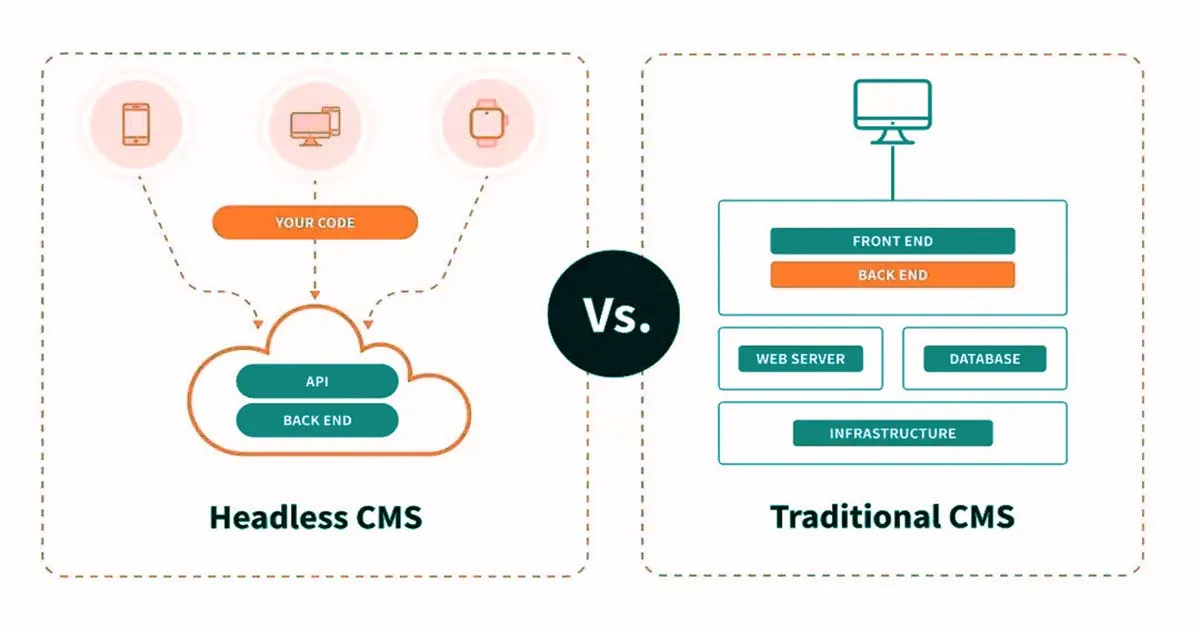
Compare Headless CMS vs Traditional CMS with pros, cons, and use cases. Learn which CMS su...

Cheap hosting may seem like a smart way to save money, but it can cost you more in the lon...
Website speed and scalability directly impact user experience, SEO rankings, and conversio...