From Manual Procurement to a Centralized Ordering Platform: How We Streamlined Multi-Branch Hospitality Purchasing
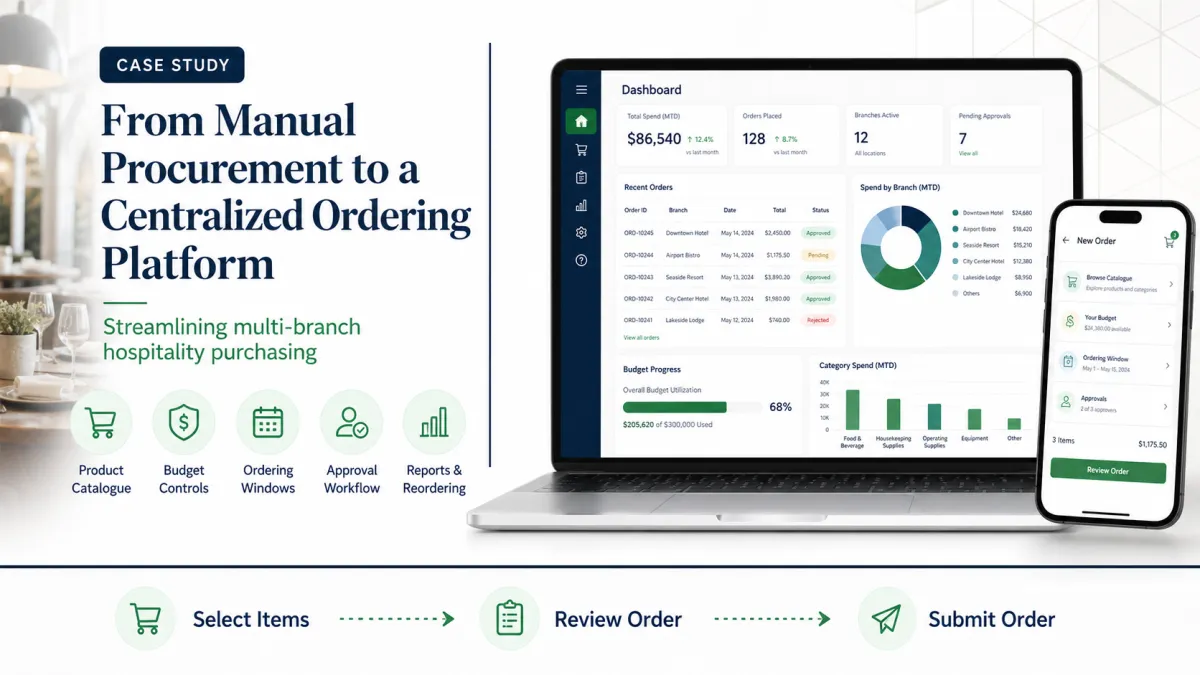
Procurement for a hospitality business with multiple branches involves much more than placing purchase orders. Each branch has its own consumption patterns, monthly budget, delivery location, approval requirements, and operational schedule. Without a structured system, everyday purchasing can quickly lead to avoidable costs, delays, duplicate requests, and limited management visibility.
We recently worked with a hospitality organization facing these challenges. Its ordering process had grown organically and relied heavily on spreadsheets, emails, WhatsApp messages, and manual approvals. As the organization expanded, the process became increasingly difficult to control and audit.
This case study explains the problems the organization needed to solve, the centralized ordering platform we developed, and the operational improvements the new workflow supports.
The Challenge
The organization operated multiple branches across different locations. Each branch regularly ordered housekeeping supplies, pantry items, cleaning chemicals, consumables, and other operational materials.
Although orders were placed every day, there was no standardized procurement workflow.
Orders Arrived Through Multiple Channels
Branch staff submitted requests through email, phone calls, spreadsheets, or messaging applications. This made orders difficult to track, increased the risk of duplicate requests, and often resulted in incomplete information. Purchase history was scattered across multiple systems instead of being available in one place.
No Control Over Ordering Windows
Branches could place orders at any time. Without a structured ordering schedule, procurement teams found it difficult to plan purchasing, vendor coordination, and logistics.
Budget Overspending
Each branch had a monthly budget, but there was no automated way to calculate current spending, remaining budget, or the effect of the next order. Managers had to perform these checks manually, making the process time-consuming and prone to error.
Approval Delays
Orders required approval before processing, but decisions were managed through emails and phone calls. There was no central view of pending, approved, or rejected orders, and limited visibility into the reason or history behind a decision.
Product Inconsistency
Different branches used different names for the same products. Some products were no longer available, while others had outdated prices or tax information. The organization lacked a single, approved product catalogue.
Limited Reporting
Management struggled to answer questions such as:
- Which branches spend the most?
- Which products and categories have the highest demand?
- Which orders are still awaiting approval?
- Which branches are approaching or exceeding their monthly budgets?
- What value is being lost through rejected orders?
Answering these questions required manually combining data from several spreadsheets.
Our Solution
We developed a centralized, web-based ordering and procurement platform for multi-branch hospitality operations. The objective was to make daily ordering faster while giving management stronger control, visibility, and traceability.
The workflow required custom development instead of no-code. We used a modern web development stack and applied SOLID software design principles so the platform could evolve cleanly.
Centralized Product Catalogue
Each client has a dedicated product catalogue containing:
- Categories and subcategories
- Product images and descriptions
- SKU codes
- Current prices
- GST rates
- Minimum order quantities
- Active and inactive product controls
Branch users see the active products available to their organization, creating a consistent source of product, price, and tax information across locations.
Role-Based Access and Branch Scope
The platform supports branch users, finance administrators, client administrators, order administrators, and platform administrators.
Branch users can order only for branches assigned to them. Client and finance administrators receive organization-wide access to their client's current and future branches without requiring individual branch assignments. Administrative resources remain separated from the client portal, supporting clearer responsibilities and stronger data isolation.
A Two-Step Ordering Flow
Ordering is designed around a simple selection-and-review process:
1. The branch user selects products and quantities.
2. The user reviews the complete draft before submitting it.
The review step groups products by category and displays quantities, current rates, GST, line totals, notes, and the final order value. It also shows the branch's current shipping address, PIN code, and GST information directly from the branch profile so the user can verify the delivery details before submission.
If something needs to be changed, the user can return to the selection step without losing the draft. Only the final Submit Order action creates the order.
Intelligent Order Validation
Before an order can proceed, the platform validates:
- Product availability
- Minimum order quantity
- Client-level minimum order value
- Current prices and GST calculations
- Branch access
- Monthly branch budget
- Active ordering windows
Validation is performed again at final submission, so the review step does not bypass current business rules.
Budget Monitoring and Enforcement
Each branch can have a monthly budget with visibility into:
- Allocated budget
- Amount already consumed
- Remaining budget
- Current draft value
- Projected balance after submission
The organization can use either warning-only mode, which alerts the user but allows submission, or enforcement mode, which blocks an order that would exceed the configured budget.
Budget warnings are displayed beside the order summary, where users can evaluate them in the context of the final order total.
Configurable Ordering Windows
Authorized administrators can configure when ordering is allowed. Rules can include:
- Start and end dates
- Allowed days of the week
- Allowed dates within a month
- Start and end times
- Global or client-specific schedules
If no window is configured, ordering remains available. When active windows exist, an order can be created only when at least one applicable window is open.
Structured Approval Workflow
Submitted orders enter a defined approval workflow. Client administrators can review complete order details, add decision notes, approve an order, or reject it with a reason.
The platform records the decision, decision-maker, date, remarks, and resulting status, giving users a central history instead of relying on follow-up messages.
Order Fulfilment and Documents
After approval, an order can move through processing, in-transit, and delivered stages. The administrative workflow supports courier information, tracking IDs, invoices, courier receipts, and proof-of-delivery files.
Relevant documents are available from dedicated download actions in the admin and portal order lists. Users can also view tracking information and export a detailed order as a PDF.
Activity History and Notifications
Important persisted actions are recorded in the activity history. These include order creation, approval and rejection decisions, status changes, administrative order-detail updates, and product or quantity changes made during administrative order editing.
Configurable email notifications can inform selected recipients when an order status changes. Together, the activity history and notifications reduce dependence on manual follow-ups and provide a clearer operational record.
Safe Reordering
Frequently purchased consumables can be reordered from the order list or order details page.
Reorder creates a new editable draft rather than immediately submitting a duplicate. It copies the previous quantities but refreshes the draft using current product prices, GST rates, minimum quantities, budget rules, ordering windows, and the branch's latest shipping address.
Inactive or deleted products are excluded and clearly identified to the user. The reordered draft still passes through the standard review and submission flow, receives a new order number, and uses the current order date.
Reporting and Exports
The reporting module supports filters for date range, month, year, branch, product, category, order status, and order number.
Available report views include:
- Detailed order report
- Order status summary
- Product demand
- Branch spend
- Pending approval aging
- Budget utilization
- Rejected orders
Careful database optimization keeps these filtered reports responsive as order history grows.
Reports can be exported in Excel, CSV, and PDF formats. The portal and administrative order lists also support exports, helping teams move from manual spreadsheet consolidation to repeatable reporting.
Operational Impact
The centralized workflow creates practical improvements across the procurement cycle.
Better Visibility
Management can review ordering activity, approval status, branch spend, and budget utilization from one platform.
Faster Daily Ordering
Branch users order from an approved catalogue, review everything on one screen, and can safely reuse a previous order when purchasing recurring consumables.
Stronger Budget Control
Real-time budget calculations warn users or block submission before overspending occurs, according to the organization's chosen policy.
Clearer Approvals and Fulfilment
Approvers can act on pending orders without relying on email threads, while branch and finance users can follow status, tracking, and available documents from the portal.
Consistent Product and Delivery Information
Every branch uses the same client-specific catalogue, and the shipping address is confirmed from the latest branch record before an order is submitted.
More Reliable Reporting
Management can generate structured operational and financial reports without manually combining multiple spreadsheets.
Conclusion
Procurement is not only about placing orders. It also requires control over spending, consistent product information, accurate delivery details, structured approvals, fulfilment visibility, and reliable management reporting.
By replacing a fragmented process with a centralized ordering platform, a multi-branch organization can create a more consistent daily workflow and establish stronger financial and operational governance.
The platform is also designed for future growth. Capabilities such as vendor management, inventory integration, advanced analytics, and AI-assisted procurement recommendations can be added as operational requirements evolve.
For organizations managing purchasing across multiple branches, a structured ordering system is more than a technology upgrade. It creates a scalable foundation for better decisions, clearer accountability, and more efficient operations.
FAQs
1. What problems does a centralized ordering platform solve?
It replaces fragmented orders from spreadsheets, emails, phone calls, and messaging applications with one structured workflow. This improves order tracking, product consistency, budget visibility, approvals, and reporting.
2. How does the platform prevent branches from ordering for the wrong location?
Branch users can create orders only for branches assigned to them. The selected branch and its current shipping address are displayed during review so delivery information can be verified before submission.
3. How does the two-step ordering process work?
Users first select products and quantities. They then review the complete order, including categories, prices, GST, shipping address, notes, and totals. They can edit the draft or submit it as a new order.
4. Can the platform prevent branches from exceeding their budgets?
Yes. Each branch can have a monthly budget. Warning mode alerts users when an order exceeds the available budget, while enforcement mode blocks submission.
5. Can ordering be restricted to specific dates or times?
Yes. Ordering windows can be configured using date ranges, days of the week, dates within a month, and start and end times. Global and client-specific schedules are supported.
6. How does the reorder feature work?
Reorder creates an editable draft from a previous order. It preserves quantities but applies current prices, GST rates, minimum quantities, budget rules, ordering windows, product availability, and shipping information.
7. What happens if a previously ordered product is no longer available?
Inactive or deleted products are excluded from the reordered draft. The platform identifies these products so users can select available alternatives before submitting the new order.
8. What reports are available?
Reports include order details, status summaries, product demand, branch spending, pending approval aging, budget utilization, and rejected orders. Reports can be exported as Excel, CSV, or PDF files.
9. Does the platform support approvals and fulfilment tracking?
Yes. Client administrators can approve or reject submitted orders with notes. Approved orders can progress through processing, in-transit, and delivered stages with tracking IDs, invoices, courier receipts, and proof-of-delivery documents.
10. Is the platform suitable only for hospitality businesses?
No. Although designed around a multi-branch hospitality use case, the workflow can support retail groups, offices, healthcare organizations, franchises, educational institutions, and other distributed operations.
Tagged in

Written by
Madhavendra DuttI build modern, high-performance websites and provide secure hosting and strategic digital marketing solutions that help businesses grow online. My focus is on clean development, speed, reliability, and measurable results.
View all posts →Related Posts
Continue exploring similar topics
After experiencing repeated information gaps and seeing three paid software systems fail t...

Discover how MDITech built WealthMap, a multi-tenant financial planning platform that help...

See how we transformed fragmented attendance records and repetitive payroll calculations i...